Ergonomics
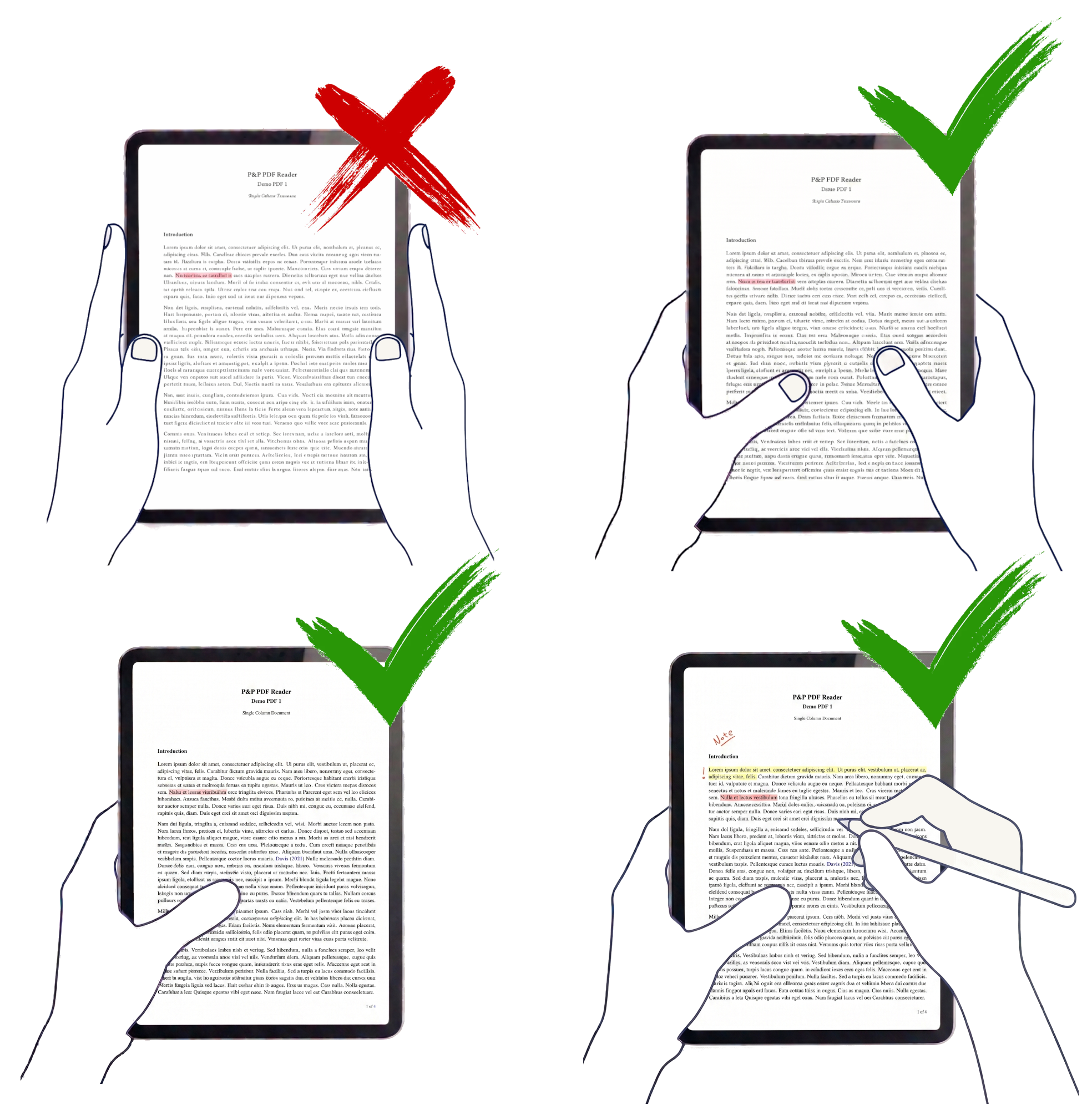
Hold the iPad naturally, like a book or a sheet of paper.
Natural grip
Rest your thumbs or fingers where they are comfortable instead of pinching the iPad only by the outer edge.
Reading posture
Use one or both hands while keeping the PDF centered, stable, and easy to scan.
Pencil compatible
Hold the tablet with one hand and annotate with Apple Pencil without losing the reading flow.
Unintended touches
Touch detection is designed to prevent accidental actions when your hands naturally contact the page.
Designed for focused iPad reading
The page stays usable when your hands are actually on the tablet.
P&P PDF Reader is built around the way people hold an iPad during long reading sessions. You can support the tablet like paper, shift between hands, and keep your thumb near the document without triggering unwanted navigation.
The goal is to let touch regions, finger gestures, and Pencil annotation work together while keeping the reader focused on the PDF instead of the interface.
Why it matters
Comfort is part of the reading workflow.
Long documents require small posture changes: two hands, one hand, a thumb on the page, or a Pencil in the writing hand. Ergonomic touch behavior makes those changes feel normal instead of risky.