P&P PDF Reader
Focus on the page.
Read, annotate, and think.
Focus on reading PDFs, marking up key passages, and highlighting what matters, with the familiar feel of paper and pencil on Apple, Android, and e-ink devices.
The same documents, everywhere
Your PDFs should stay with you, wherever you read.
Read, highlight, and annotate with a familiar workflow on Apple, Android, and compatible e-ink devices. Keep your documents and ideas close as you move between screens. PDFs and annotations can be synced through your own cloud service, so they stay available and up to date across devices. Annotations are added to the original PDF, and the document remains yours to access from anywhere. Nothing is stored on the app’s servers.
One PDF. Every screen.
P&P PDF Reader
A focused PDF reader and annotator that keeps the page central, with natural handwriting, highlighting, links, and easy navigation across Apple, Android, and e-ink devices.
*Check the list of tested e-ink devices here.
Built for focused reading
Stay with the page. Do more with your PDFs.
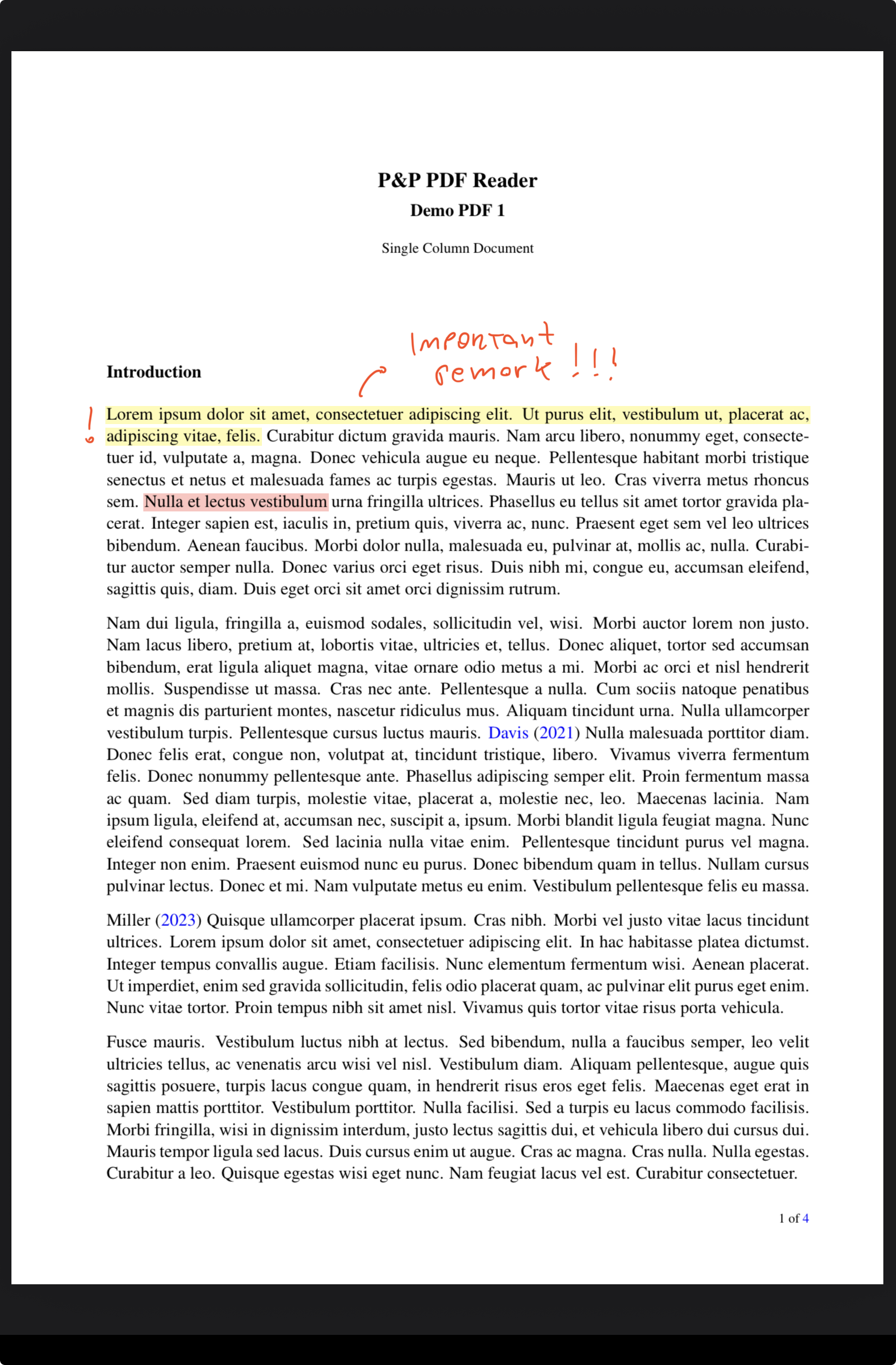
- Full-screen reading without distracting toolbars
- Pen always ready for handwritten annotations
- Long-press with your stylus to highlight or select text
- Scratch out ink to erase handwritten strokes
- Freehand and rectangular lasso selection
- Context menus for text, highlights, and handwritten notes
- Add notes to selected text
- Create links to URLs and other PDF pages
- Add entries to the Table of Contents
- Bookmarks for important passages
- Search selected text with Google or Google Scholar
- Translate selected text and look up words
- Customizable edge regions for common actions
- Finger gestures for pages, links, and navigation history
- Quick switching between open and recent PDFs
- Crop to text to reduce blank margins
- Flexible view modes for dense pages and columns
- Quick Access and Recents for active documents
- Folders and PDF management with long-press actions
- Cloud-first, local synced, and local-only storage
- Cloud synchronization with visible sync status
- Export and share your annotations
- Natural tablet holding with accidental-touch rejection
- Apple, Android, and compatible e-ink support
- Private documents stored under your control
- Many more
See it in action
Videos with Demonstrations
Reading & navigation
Move through documents without losing your place.
Navigate with gestures and edge regions
* Recorded on iPad with a sample PDF. Touch cues added for clarity.
Create links and use split view
Save link targets with the pen context menu, or link selected text to another PDF page. Open targets 1 and 2 with two- and three-finger downward swipes, switch targets, resize split view, and return after a page jump.
* Recorded on iPad with a sample PDF. Touch cues added for clarity.
Follow cross-references in split view
Tap a citation or figure cross-reference once to preview its destination in split view, where the target blinks. Double-tap to open the full page, then swipe right with two fingers to return to your reading.
* Recorded on iPad with a sample PDF. Touch cues added for clarity.
Switch PDFs and adjust the reading view
Move between reference documents, crop blank margins, and choose a view mode for dense pages.
Video coming soon
Annotation & sync
Mark up what matters and keep your documents close.
Write, highlight, and erase
Pen, lasso, and eraser are always ready. Write and highlight, select and move annotations with Auto-lasso, or scratch out ink to erase. Switch between pen, lasso, and eraser without opening menus or pressing pen buttons, keeping your focus on the content.
Where supported, pen buttons and gestures can also be configured to activate the lasso or eraser.
* Recorded on iPad with a sample PDF. Touch cues added for clarity.
Import PDFs and sync to your cloud
Choose cloud-first, local synced, or local-only storage, and keep track of document sync status.
Video coming soon
App Design Philosophy
- Distraction-free reading
- Natural paper-and-pencil annotation flow
- Ergonomics
- Privacy
The app is designed around four central principles:
- Distraction-free reading and annotating experience
- Natural paper-and-pencil annotation flow
- Ergonomics
- Privacy
Traditional PDF readers often divide attention between the document and layers of toolbars, buttons, and navigation panels. Even simple actions — such as highlighting text or writing handwritten notes — frequently require interacting with menus. This constant shift of attention disrupts reading flow and reduces immersion.
This app takes a different approach: interaction happens directly with the document itself. Every interaction is built to preserve focus on reading and annotating — not on navigating toolbars or menus.
The goal is to make the technology disappear, so the experience feels as immediate and focused as reading and annotating on real paper. Its interface is carefully crafted to recreate the natural experience of working with paper and pencil, while combining the flexibility and power of a digital workflow.When a PDF is opened, the document becomes the entire workspace. Interface elements fade away, leaving only the content on screen. The pen tool is immediately ready for annotation, allowing users to write, highlight, and sketch directly on the page without interrupting concentration or shifting attention away from the document toward navigation bars, toolbars, and menus.
Navigation through PDF pages and links is performed through simple finger gestures and configurable edge regions, allowing users to adapt interactions to their own workflow and reading habits.
The app is carefully designed to support ergonomic and natural table holding while reading and annotating. Gesture recognition is engineered to distinguish intentional interactions from the simple act of holding the device, allowing users to rest their thumbs naturally on the screen — as they would when holding a paper document or book — without triggering unintended actions such as page turns, zooming, or menu activation.
Privacy is fundamental to the app’s design. Users maintain complete ownership and control of their documents and annotations: no PDF content, handwritten notes, highlights, or personal reading data is ever collected, analyzed, or stored by the app. Your documents remain yours — private and fully under your control.
PDFs and annotations can be securely synced through the user’s own cloud storage service, keeping documents accessible and up to date across devices while ensuring users remain in full control of their data.
Made for Apple, Android, and e-ink devices
Made for full-screen reading, handwriting, and fewer distractions.
Paper & Pencil PDF Reader gives serious reading the tactile feel of a notebook while preserving the speed and flexibility of digital documents.